4. Train your own model
4.1. Introduction of object detection model training.
The detailed traing concepts and process can be found in our paper.
4.2. Dataset Preparation
Same as the usual object detection neural network, Deep-Transit requires image files and their corresponding label files. The image and label files can be derived from Kepler, TESS or other photometric missions. Below is an example of our Kepler dataset, The details of dataset generation are given in our paper.
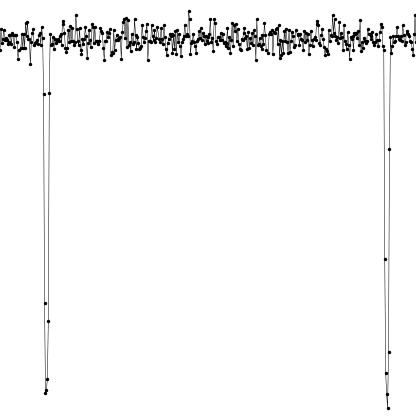
Its corresponding label file should contain:
0.1117120444000412,0.5045446849388803,0.028724771570025325,0.8975029630385283,104.01682701095234
0.9300581187578871,0.5229003724488707,0.028724771570025325,0.934214338058509,97.4743669975705
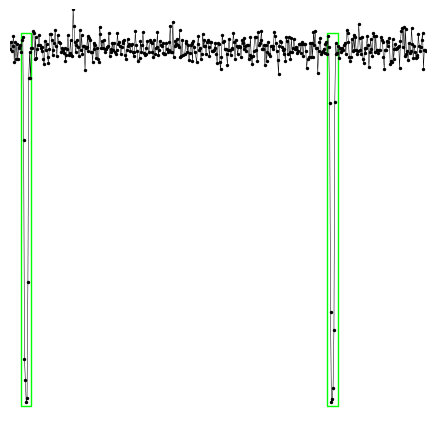
Those two lines indicate the coordinates (in relative ratio) and signal-to-noise ratios (SNR) of two bounding boxes. The format of each line is in Standard YOLO style: [x_center, y_center, width, height, SNR]
If we plot the light curve with its corresponding bounding boxes, it looks like this:
4.3. Training
Once you have parepared your sample and divided them into training and validation data set, you can start your configuration and training your model.
[1]:
import deep_transit as dt
If you have GPU, you can set the BATCH_SIZE to a number as large as possible. For example, a single GPU card with 16 GiB memory could accept BATCH_SIZE = 48. Here we use 2 for example.
[2]:
dt.config.BATCH_SIZE = 2
And the largest number of epochs you would like to train, here we use 1 just for example.
[3]:
dt.config.NUM_EPOCHS = 1
Then, you need to set the path of your data set.
[4]:
dt.config.DATASET = 'your data path'
dt.config.IMG_DIR = dt.config.DATASET + '/transit-images/'
dt.config.LABEL_DIR = dt.config.DATASET + '/transit-labels/'
If you want to save the checkpoints during your training:
[5]:
dt.config.SAVE_MODEL = True
dt.config.CHECKPOINT_FILE = "./checkpoint.pth.tar"
Or if you have an already trained checkpoint model file, you can load it.
[6]:
dt.config.LOAD_MODEL = False
Now, you can train your model.
[7]:
dt.train()
/home/ckm/PycharmProjects/Deep-Transit/tests/Data
/home/ckm/miniconda3/envs/deep-transit/lib/python3.8/site-packages/torch/cuda/amp/grad_scaler.py:116: UserWarning: torch.cuda.amp.GradScaler is enabled, but CUDA is not available. Disabling.
/home/ckm/miniconda3/envs/deep-transit/lib/python3.8/site-packages/torch/cuda/amp/autocast_mode.py:118: UserWarning: torch.cuda.amp.autocast only affects CUDA ops, but CUDA is not available.  Disabling.
  0%|          | 0/1 [00:00<?, ?it/s]
On Validation loader:
100%|██████████| 1/1 [00:01<00:00, 1.33s/it]
AP50: 0.000, AP750: 0.000, AP90: 0.000
0%| | 0/1 [00:00<?, ?it/s]
On Validation loader:
100%|██████████| 1/1 [00:01<00:00, 1.39s/it]
AP50: 0.000, AP750: 0.000, AP90: 0.000
[ ]: